Installation & Run
Everything you need to set up Dexter and run the pipeline through the OpenCode TUI. Confirm Requirements first, missing Blender, API keys, or OpenCode auth will block specific steps.
Setup
Clone the repository
git clone https://github.com/aakashvarma/dexter.git
cd dexter
Install OpenCode
curl -fsSL https://opencode.ai/install | bash
opencode --version
Authenticate
opencode          # open the TUI
/connect          # authenticate at opencode.ai/auth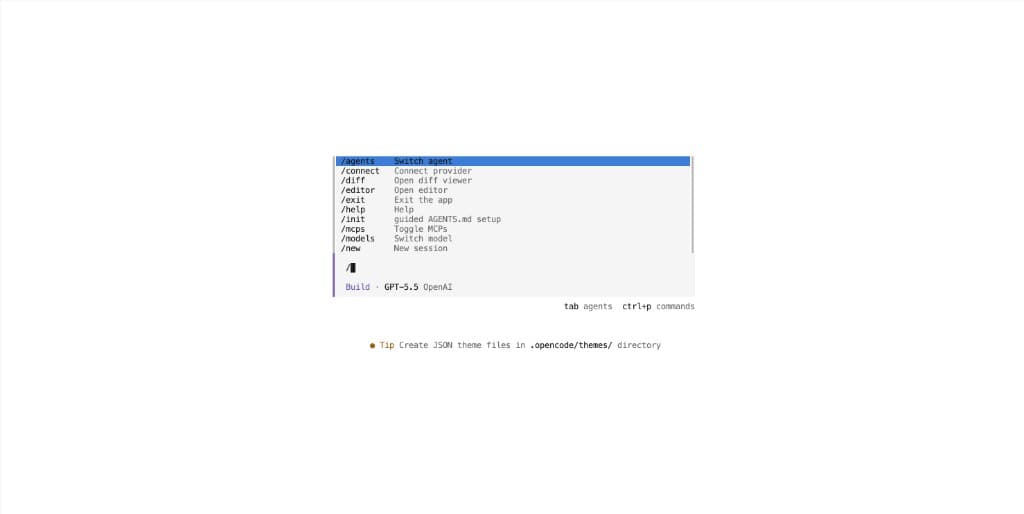
Initialise the project
From the repo root inside OpenCode:
/initThis writes AGENTS.md: the agent-facing source of truth for pipeline semantics.
Install Python dependencies
pip install -r requirements.txtRecommended with a virtual environment:
python3 -m venv .venv
source .venv/bin/activate
pip install -r requirements.txt
Install Blender
macOS: brew install --cask blender
Linux: sudo snap install blender --classic
Verify: blender --version
Set API keys
Add to ~/.zshrc or ~/.bashrc, then reload:
export OPENAI_API_KEY=sk-...   # component PNGs
export FAL_KEY=...             # image-to-3D GLBs
Verify installation
python3 -c "import fal_client, openai, jsonschema, yaml; print('Python OK')"
blender --background --version
test -n "$OPENAI_API_KEY" && echo "OpenAI OK"
test -n "$FAL_KEY" && echo "fal OK"
opencode --version && echo "OpenCode OK"
Blender not on PATH? Set the full path in configs/base.yaml under paths.blender_binary (see Optional settings below).
Run the pipeline (TUI)
Open OpenCode in the repo
cd /path/to/dexter
opencode
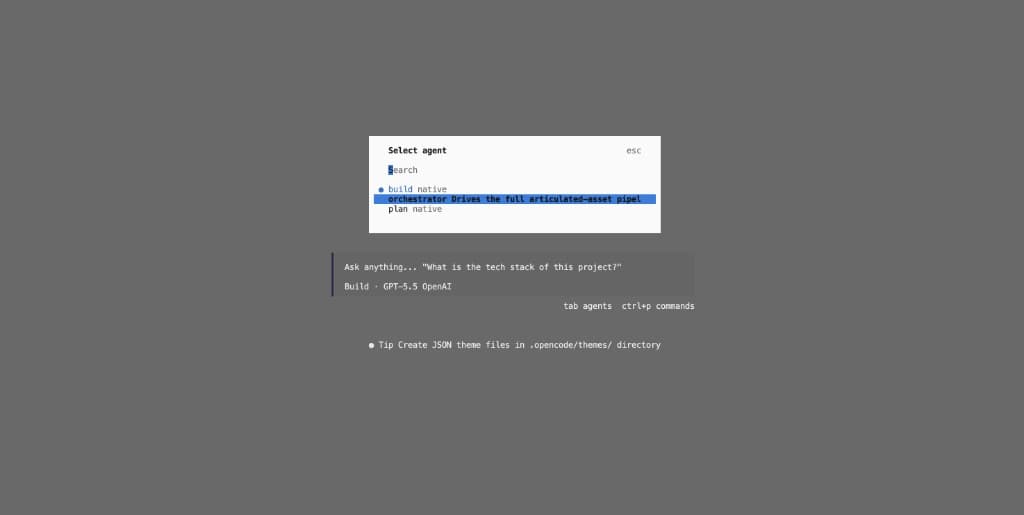
Select the orchestrator agent
Press Tab or type /agents, then choose orchestrator:
Describe your task
Type a prompt in the chat. For a new asset:
build the dishwasher from input_images/dishwasher.pngThe orchestrator copies the image to .intermediate/<asset>/<NNN>/source.png, picks the next run number, and drives the full pipeline.
Respond at human gates
The run pauses twice for your input, do not let the agent continue on its own:
| Gate | When | What to review |
|---|---|---|
| Parts | After parts.json | Part names, descriptions, joint types, sizes and poses |
| Placement | After the critic loop | Best iteration renders, critic score, assembled.blend |
Reply in the TUI when you are satisfied, or ask for edits before continuing.
Useful slash commands: /agents (switch agent) · /connect (re-authenticate) · /init (re-analyse project) · /new (fresh session)
Resume or continue a run
Point the orchestrator at an existing run directory. Type prompts like these in the TUI:
resume .intermediate/dishwasher/001/parts confirmed, continue .intermediate/dishwasher/001/run 3 more placement iterations for .intermediate/dishwasher/001/The orchestrator lists .intermediate/<asset>/<NNN>/ before every step and skips outputs that already exist and validate. You can safely resume after an interruption or a human gate.
What the pipeline does
High-level flow (orchestrator-owned; two subagents handle analyze and critic):
- Analyze: source image →
parts.json - Parts gate: you confirm the part list
- Components:
generate_components.py→ PNGs, GLBs,component_dims.json - Placement init:
initialize_placement.py→iterations/001/assembly.json(with pre-computednode_scale/node_origin) - Placement ↔ critic loop: assemble → render → critique → apply corrections until stop conditions hit
- Placement gate: you approve the best layout
- USD export:
robot.usda+textures/+robot_prim_map.json
Placement iterations are append-only. To tweak layout after the gate, start a new iteration through the critic loop, do not delete iterations/ or redo analyze/components.
Loop stops when any of: score ≥ loop.score_threshold (and N ≥ min_loops), N ≥ max_loops, or score has not improved for no_improvement_patience iterations. The best-scoring iteration is kept even if a later one regresses.
Run output
Every run writes to .intermediate/<asset>/<NNN>/ (gitignored):
.intermediate/<asset>/<NNN>/
├── source.png
├── parts.json
├── component_dims.json
├── component_images/
├── component_glbs/
├── iterations/
│   └── NNN/
│       ├── assembly.json
│       ├── assembled.blend
│       ├── render_views.json
│       ├── renders/          # front, top, left, isometric
│       └── critic.json
├── robot.usda                # final deliverable
├── robot_prim_map.json
└── textures/| Pattern | Example | Meaning |
|---|---|---|
<asset> | dishwasher | From parts.json → object |
<NNN> | 001 | Zero-padded run number |
Optional settings
All knobs live in configs/base.yaml (opens in a new tab). Defaults work for a first run: only change these when you have a specific reason.
Loop behaviour (loop in configs/base.yaml)
| Key | Default | What it does |
|---|---|---|
min_loops | 1 | Minimum placement ↔ critic rounds |
max_loops | 5 | Hard cap on iterations |
score_threshold | 85 | Stop when critic score reaches this (and N ≥ min_loops) |
no_improvement_patience | 2 | Stop after this many iterations with no score improvement |
Faster iteration: lower max_loops to 3. Higher quality: raise max_loops to 8 and score_threshold to 90.
Component images (image_generation)
Controls OpenAI image generation in generate_components.py. Paths are relative to <run_dir>/.
| Key | Default | What it does |
|---|---|---|
model | gpt-image-2 | Image model (dall-e-3 also supported) |
size | 1024x1024 | Output resolution |
quality | medium | low / medium / high: lower saves cost |
background_instruction | white background text | Appended to every part prompt |
Cheaper runs: set quality: "low".
3D meshes (fal)
Controls fal.ai image-to-3D in generate_components.py.
| Key | Default | What it does |
|---|---|---|
endpoint | fal-ai/hunyuan-3d/v3.1/pro/image-to-3d | fal.ai model |
face_count | 40000 | Target mesh density |
enable_pbr | true | PBR materials on GLBs |
download_timeout_seconds | 300 | GLB download timeout |
Render quality (render)
Defaults the orchestrator uses when writing render_views.json each iteration.
| Key | Default | What it does |
|---|---|---|
resolution | [1920, 1080] | Render size in pixels |
samples | 64 | Cycles samples (higher = slower, cleaner) |
engine | CYCLES | Blender render engine |
Faster previews: [1280, 720] resolution and samples: 32.
Paths (paths)
| Key | Default | What it does |
|---|---|---|
blender_binary | blender | Blender executable, set full path if not on PATH |
input_dir | input_images | Bundled source photos |
intermediate_root | .intermediate | Run output root |
USD export (usd)
| Key | Default | What it does |
|---|---|---|
root_prim_path | /World/Robot | Root prim path in robot.usda for Isaac Sim |
Agent permissions live in opencode.json, not base.yaml. Subagent prompts are under .opencode/agents/. Change these only when extending the pipeline, see Extending the Pipeline.
Troubleshooting setup
| Problem | Fix |
|---|---|
blender: command not found | Install Blender or set paths.blender_binary in configs/base.yaml |
ModuleNotFoundError: fal_client | pip install -r requirements.txt in your active venv |
OpenCode /connect fails | Check network; try npm install -g opencode-ai |
| Blender hangs on first run | Normal on macOS, grant permissions in System Settings |
Next steps
| Topic | Page |
|---|---|
| End-to-end walkthrough with example outputs | Sample Run: Dishwasher |
| Pipeline stages and loop logic | Agentic Loop |
| Common failures during a run | Troubleshooting |